ⓘ We are reader-supported and may earn a small commission at no additional cost to you if a purchase is made through one of our links.
Remember the days when people used to frame printouts of their photos? Well, gone are those days, thanks to the advancement in digital photo frame technology. The best digital photo frames will allow you to create slideshows of all your memorable moments, which is great since you won’t have to cramp up your space with traditional frames.
In addition to this, most digital photo frames have additional features that you’ll find helpful. A good number allows for wireless transfer of image data, meaning you can display photos from all compatible devices without experiencing any problems. Some of these units have a built-in music player and can also play videos, making them even more convenient.
TL; DR: The #1 Digital Photo Frame for Most People 👇

The Skylight Digital Picture Frame has a screen resolution of 1280×800 and will provide you with images that are not only clear but also accurate. Additionally, it features a touchscreen display for easy navigation and also has a reliable email service that will allow you and your fam to share photos regardless of where you are. Even though it has a subscription service that comes at an extra cost, this frame works great and is worth buying!
However, finding the best digital photo frame is no easy task. There are countless options to choose from and a range of factors that need to be taken into consideration. That said, we have created this buying guide to help you find the ideal digital photo frame for your needs.
The Best Digital Photo Frames to Buy Today in Australia
- Best Overall Digital Photo Frame: KODAK RWF-109 Digital Photo Frame
- Best for Most People: Skylight Digital Picture Frame
- Best Corded Digital Photo Frame: AILRINNI Digital Photo Frame
- Best Touchscreen Digital Photo Frame: HaiZR Digital Photo Frame
- Best Digital Photo Frame for the Money: TEKXDD Digital Photo Frame
1. Best Overall Digital Photo Frame: KODAK RWF-109 Digital Photo Frame

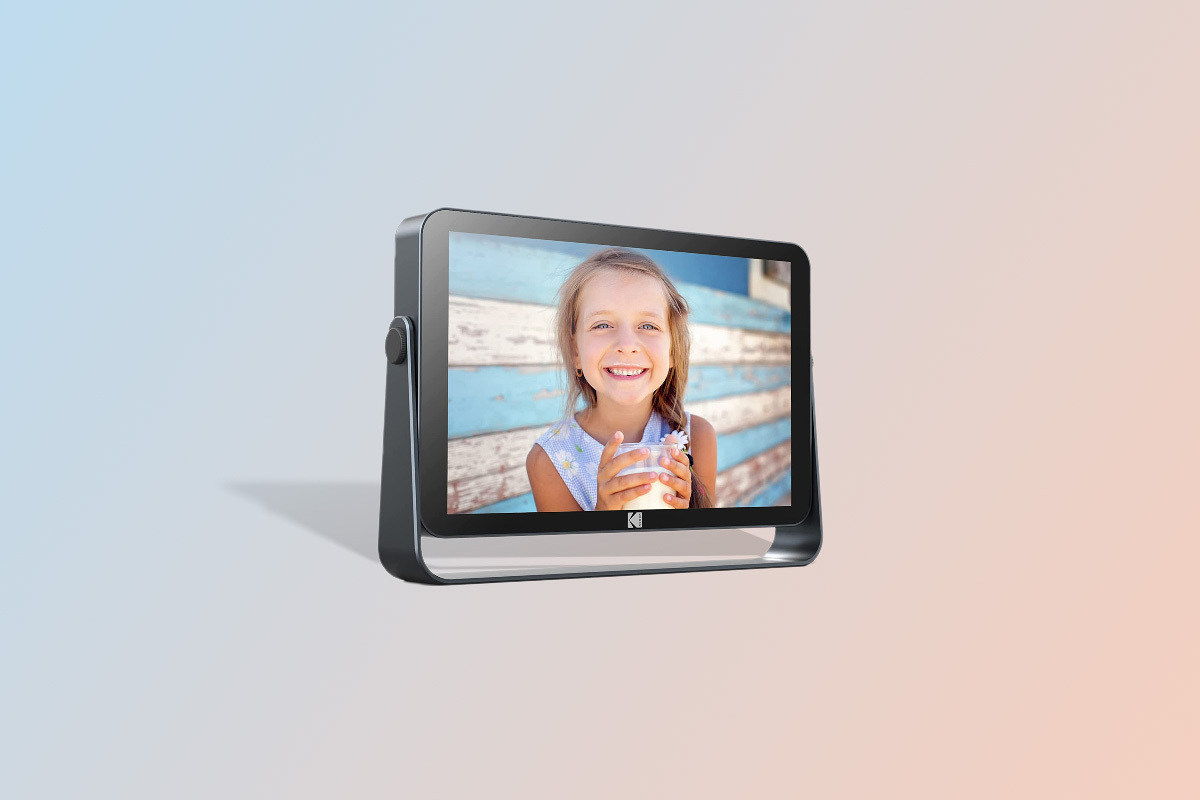
We chose the KODAK RWF-109 Digital Photo Frame as our top pick for the best digital photo frames due to its large internal memory, reliable battery, and excellent build quality. The frame measures 258mm x 182mm x 43 mm and sports an IPS display for sharp and accurate images at different viewing angles.
You can set the screen at different angles for comfortable viewing, thanks to its articulating design. In addition to having 32GB of internal storage, you can expand the memory to an additional 64GB using a MultiMediaCard (MMC), SD, or SDHC card. Alternatively, you can insert a U-disk into the USB port. But that is not all, KODAK provides up to 10GB of cloud storage, so you will have enough space to store all your favourite photos.
The KODAK RWF-109 is Wi-Fi enabled, meaning you can instantly feed in photos wirelessly through the KODAK app. Also, the app is compatible with both Android and iOS operating systems. Plus, it has a straightforward design and is equally easy to set up, making it ideal for everyone. As such, you don’t have to be tech-savvy to get this digital picture frame up and running.
You will be happy to know that the RWF-109 supports jpeg, bmp, and png file formats. The built-in G-sensors allow photos to automatically switch between landscape and portrait orientation depending on the position of the frame. To add to its list of features, this digital frame has a calendar, clock, and location function, all of which are updated automatically based on your Wi-Fi’s IP address.
As if that is not enough, the RWF-109 can play video (mkv, mov, and mp4 formats) and music (mp3, ogg, flac, wav, and acc formats) files. When it comes to build quality, the frame features a metal body with corrosion-resistant paint coating to keep rust at bay. However, some parts are made of high-quality plastic for maximum durability. If you are after quality, the KODAK RWF-109 is the way to go.
2. Best for Most People: Skylight Digital Picture Frame
Why we like it:
- User-friendly design for quick setup
- Allows you to email photos to your loved ones from anywhere
- Wi-Fi enabled for wireless transfer of photos
- Durably built to give you long-lasting service
What customers say:
“This was a Christmas gift for my Nan and she loved it. Allowed family near and far to send pictures at any time of the day.”–Kasey Anne Ladhams
The Skylight Digital Picture Frame is one of the top-rated digital photo frames that you can consider buying in Australia. This unit is a favourite among most people because it’s easy to use and also offers amazing features that will completely change how you share your memorable moments with your loved ones.
For starters, it has great email features that will allow everyone in your family to send photos regardless of where they are. All you need to do is create a Skylight email and you will be good to go. To add to this, the frame supports wireless connections through Wi-Fi. The screen has a resolution of 1280 x 800, which is good but not great.
Still, the display produces clear, sharp, and accurate photos that are worth looking at. And like most digital photo frames in this guide, the Skylight picture frame has a touchscreen that allows you to go through your photos with a simple swipe. The scream is 254mm, so it’s wide enough to give you a clear view of your pictures.
Bear in mind that you will be required to pay a subscription fee to use some of the services. The other thing worth mentioning is that this unit does not have a built-in battery, so it needs to stay plugged in for it to work. All factors considered, this a well-designed digital photo frame that is worth the price.
3. Best Corded Digital Photo Frame: AILRINNI Digital Photo Frame
Why we like it:
- Touchscreen for easy navigation
- Adjustable screen brightness for a customised user experience
- Plug-and-play design for easy operation
- Auto-rotate function for landscape or portrait orientation
What customers say:
“Great quality picture frame that the grandparents love! The Frameo app is easy to use and we all love seeing pictures that are normally just kept on our phones.”–MJT
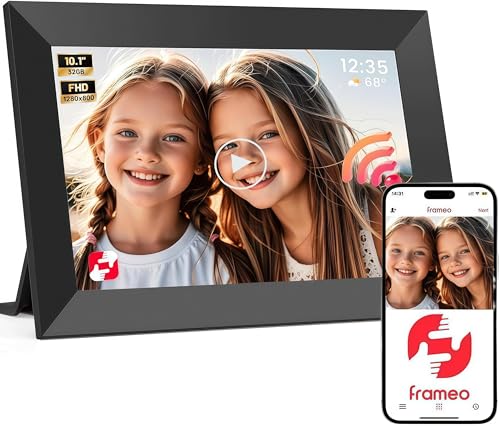
With an aspect ratio of 16:10 and a resolution of 1280×800, the AILRINNI Digital Photo Frame is yet another reliable option that you can go for. It supports bmp, jpeg, and png formats, so it won’t limit you when sharing your photos. Additionally, it can play short videos, making this one of the most versatile digital frames that you can buy.
The auto-rotate function will change the orientation of the photo under view depending on the position that the frame is in. This frame features 16 GB of internal storage and also has an SD card slot that supports memory cards up to 32 GB. To make it even more convenient, the AILRINNI digital photo frame has a built-in music player. It has two 2W speakers that are strategically placed for balanced sound.
To add to this, the IPS display allows for multi-angle viewing. You can also adjust the screen brightness according to your preference. This digital picture frame comes in two designs, you can pick this model or the wooden version. Both options can go well with most decor styles, so the final decision is yours to make.
Like all the frames that we have chosen for you, this unit is made of high-quality materials for durability purposes. Attached to the frame is a stand that is designed for stability. The frame also has two hanging grooves for added convenience. If you prefer corded digital photo frames over cordless variants, this may just be the right product for you.
4. Best Touchscreen Digital Photo Frame: HaiZR Digital Photo Frame

Why we like it:
- Expandable memory for storage space
- Receives photos through a secure channel
- It has a built-in video player
- Supports micro-USB and SD media
What customers say:
“I am very impressed with this great little frame. We had it set up and receiving photos and videos from our family in the USA within 10 minutes. I love being able to see amazing pictures of my beautiful granddaughter within minutes of being taken…”–Sonya Mc
The HaiZR Digital Photo Frame is sleek, compact, and durable. This gadget has virtually all the features that you may look for in a digital picture frame. It has great app support, so rest assured your loved ones will be able to share with you their photos without experiencing any problems.
Furthermore, it uses an encrypted channel for maximum user safety. With up to 16 GB of internal storage, this frame can store hundreds of pictures. This may however vary depending on the format and quality of the pictures. It boasts a high-definition IPS screen, with a resolution of 1280×800. Pair this with a 16:9 aspect ratio and you will have bright and sharp images.
Similar to most digital frames that are currently on the market, this unit is Wi-Fi-compatible. This means you can pair it with other devices for fast transfer of images. It also gives you the option of using an SD media or USB drive. That way, you can view slideshows of your pictures from whichever source you want.
The frame can automatically adjust the screen orientation from landscape to portrait and back to suit your viewing angle. Best of all, it supports mp4 videos, so you can relive memorable moments over and over by playing your favourite videos. On the downside, this unit lacks a motion sensor and other features found on high-end digital photo frames but is still a great product nonetheless.
5. Best Digital Photo Frame for the Money: TEKXDD Digital Photo Frame

Why we like it:
- High-resolution display for quality photos and videos
- The app has a simple user interface for easy operation
- The built-in audio system makes it convenient
- 16GB worth of internal memory
What customers say:
“I brought this for my mother as a Christmas present. Pretty easy to use and set up and the great thing is that other family members can send photos directly to it once you give them the code. There are some difficulties in sizing the photos but that would be the case with any electronic photo frame.”–Tenn
Tekxdd is known for making high-quality digital photo frames, so you can buy the TEKXDD Digital Photo Frame without worries. The IPS screen offers a wide view angle of up to 178 degrees, allowing you to place the frame in different positions without sacrificing image quality. The beauty of this frame is that it allows you to share videos and photos from anywhere.
It has a large internal storage, but you can as well use a 32GB SD card to increase the memory. With the help of the frameo app, you can link this digital picture frame to more than one device. This will allow you to receive photos from your mates and family members without having to use another frame.
More on this, the app is designed with every user’s need in mind and can work with iOS and Android devices. There are two ways in which you can set up this photo frame—you can place it atop your desk and can also hang it on a wall. This frame has a timer that allows you to customise the sleep-wake function according to your needs and preference.
With this feature in place, you can schedule the frame to power on/off when needed. Setting up this device is also very easy, so it won’t waste your time. One of the disadvantages of this digital photo frame is that it only supports 15-sec videos. On the plus side, it produces high-quality photos/videos and is definitely worth purchasing.
How We Researched the Best Digital Photo Frames
To find the best digital photo frames, we started our search by visiting local e-commerce stores in Australia such as Harvey Norman, The Good Guys, and Bunnings. This allowed us to identify the digital photo frames frequently bought by Aussies. We also considered the ratings and reviews left by customers.
Through this, we were able to pick 10 photo frames from 8 different brands. To ensure that you get the best digital picture frames, we only chose products from reputable brands. Additionally, we visited Amazon Australia and read through several reviews to see what people had to say about each unit that we had picked.
We then compared the digital photo frames based on Screen size, Aspect ratio, Connectivity, Resolution, Supported picture format, Built-in memory, Power source, Aesthetics, and Additional features. We had to do away with 5 digital photo frames because they did not meet all our standards. This left us with 5 of the best digital photo frames that you can buy in Australia.
Digital Photo Frames: Buying Guide
Digital photo frames come in different sizes and also have varying features. Plus, various brands make and sell these gadgets, so knowing the one that is right for you can be challenging.
Always keep in mind that not all digital photo frames are built equal. Some of these gadgets are more advanced and also produce clearer photos/videos than others.
What to Consider When Buying a Digital Photo Frame
Here are some of the factors that you need to keep in mind when shopping for a digital photo frame:
Connectivity
Digital photo frames have different connectivity options. Most of these devices can be linked to other gadgets via Wi-Fi, while others use Bluetooth technology. Some models also support USB drives and SD cards, so ensure that you consider the source from which you intend to obtain your photos and videos before buying a digital picture frame.
Screen Size
The size of the screen on your digital photo frame matters a lot since it affects the resolution. This will, in turn, impact image quality. Although it’s recommended that you go for frames with larger screens, such frames tend to produce fuzzier images if the pixels are spread out over a wide area.
Aspect Ratio
This refers to the ratio of the height to the width of the picture formed on the screen. Most digital picture frames have an aspect ratio of 16:9, making them ideal for displaying still images and videos.
Built-in Memory
A good digital photo frame should have internal storage for storing photos and videos. Models like the KODAK RWF-109 offer an impressive 32GB of internal memory, making it one of the best digital photo frames in this department.
You should also check if the frame supports cloud storage services, as this can come in handy when the internal memory is full. Some frames also allow you to expand the memory to a specified limit.
Resolution
In digital photo frames, resolution refers to the number of pixels that can be displayed vertically and horizontally on a screen. If you are looking to get quality photos and videos, you should consider buying a high-resolution frame.
Anything below 1280×800 may affect image quality, thus providing you with photos that are not as clear and accurate.
Picture Format
Before spending your dough on a digital photo frame, you need to check the supported file formats. Most, if not all, digital picture frames support jpeg image files. There are units that can work with additional formats such as png, tiff, and BMP.
Power Source
Depending on your budget, needs, and preference, you can go for a corded or cordless digital photo frame. The latter feature built-in batteries that you can juice up from time to time, while the corded models need to be plugged in.
Aesthetics
If you are all about style, you should pick a frame that can blend well with your decor style. Some brands offer colourful frames that can complement your space, so you should choose wisely.
Additional Features
Some digital photo frames have extra features that can assist you in different scenarios. You can buy frames with a built-in music player, clock function, video player, calendar function, auto-rotation, and motion sensors, to mention but a few.
You may also be interested in:
- The Best Selfie Sticks for Picture-perfect Snapshots
- The Best Smartphone Gimbals for Professional Quality Videos
- The Best Ring Lights for Flawless Filming & Perfect Photos
Last update on 2026-07-06 / Affiliate links / Images from Amazon Product Advertising API