ⓘ We are reader-supported and may earn a small commission at no additional cost to you if a purchase is made through one of our links.
If you are a YouTuber, podcaster, or on-air personality, you should consider investing in one of the best microphone arms in our list. These accessories can greatly assist you when it comes to positioning your microphone. With the right microphone arm, you will be able to record or stream rumble-free audio every time when communicating with your audience.
They can particularly come in handy when creating sound-sensitive recordings in the studio or at home. Plus, most microphone arms come with accessories that can help protect your mic while improving audio quality. The best microphone arm is one that can allow you to make vertical, horizontal, and rotational adjustments with minimal restriction.
TL; DR: The Best Microphone Arm for Most Australians 👇
No products found.
However, not all microphone arms will provide you with the level of stability that you need. Some units are poorly built and equally stable.
Table could not be displayed.
To avoid damaging your microphones, you can go for any of the microphone arms that we have listed below:
The Best Microphone Arms to Buy Today in Australia
- Best Overall: Elgato Wave Mic Arm
- Best for Most People: RØDE Microphones Premium Professional Studio Boom Arm
- Best Microphone Arm for Podcasting: Gator Frameworks Deluxe
- Best Overhead Microphone Arm: RØDE Swivel Mount Studio Microphone Arm
- Best Value: Brateck Professional Microphone Boom Arm Stand
- Best Microphone Arm for Blue Yeti: Findyouled Microphone boom Arm Stand
- Best Budget: Neewer Microphone Arm Stand
1. Best Overall: Elgato Wave Mic Arm
No products found.
Our top pick for the best microphone arms is the due to its premium construction, ease of setup, and versatile design. The thread adaptor on this microphone arm is compatible with 9.53mm, 6.35mm, and 15.875mm mic mounts. This means it won’t limit you in any way when it comes to choosing microphones and shock mounts.
Additionally, the arm is height adjustable and will allow you to extend your microphone vertically up to 750mm. In addition to this, it features a swivel ball head for limitless manoeuvrability. Moreover, the ball head is designed such that you can make precise mic adjustments without impacting the unit’s overall stability.
Since the microphone arm is sturdily built, it will securely hold your mic without it falling over. You won’t have to worry about the arm moving while you are typing because all the joints are innovatively engineered to counteract unwanted movements. More on stability, the clamp mounting base will ensure the mic arm stays in place at all times.
As such, the unit won’t come loose, provided that you properly fasten the clamp. You will be happy to know that this microphone arm is counterweighted to enhance stability regardless of the position that you place it. With that being said, this equipment will remain stable even when the arm is fully extended.
It also comes with a detachable 15cm riser for user convenience. This accessory can particularly come in handy when working with ultra-wide monitors as it allows you to extend the mic arm over your monitor without experiencing any problems. Plus, the mic arm comes pre-assembled, so you’ll only have to attach the mounting base.
The included clamp is compatible with desks that are up to 6cm thick. With a horizontal reach of 780 mm, you can move your microphone closer or away from you with ease. When you purchase this microphone arm, you will get all the accessories needed for set-up, including an Allen wrench that will help you tighten the joint.
What’s more, the mic arm has a noise-free design, so it won’t make creaking sounds as you adjust your microphone. It will enable you to stream and record high-quality audios that are equally rumble-free. We highly recommend this mic arm to podcasters, YouTubers, online streamers, and any other professional who is looking for a high rise microphone arm.
2. Best for Most People: RØDE Microphones Premium Professional Studio Boom Arm
No products found.
Much like Elgato, Rode is a renowned microphone arm manufacturer, so rest assured the will provide you with long-lasting service. But most importantly, it enables you to set your microphone in the most ideal position for effective audio capture.
On top of that, the arm is fitted with a tension spring to allow for precise microphone adjustment. This mic arm has cable clips on which you can attach wires for a neat working space. Both the upper and lower section of the arm is covered in neoprene for aesthetic purposes.
The smooth-gliding joints not only limit mechanical noise but will also allow you to make effortless adjustments. This equipment won’t squeak, and neither will it topple over when adjusting your microphone. And like most microphone arms on the market, the PSA1+ comes with a C-style clamp that you can attach to the edge of your desk in seconds.
To add to this, the rotatable microphone holder allows for complete 360° rotation. This will allow you to position the mic at different angles for high-quality audio. This mic arm can accommodate most standard microphone mounts, thanks to its flexible design.
It can securely support microphones that weigh up to 1.2 kilograms. You can also attach shock mounts with 9.53mm or 15.875mm thread adaptors. As you can see, this product has all the features that you may look for in a microphone arm, so it can be an excellent addition to your desk setup.
Most people prefer the Rode PSA1+ to other microphone arms because it has a user-friendly design, is durable, and is reliable. It also gives users the option of choosing between the clamp base and the threaded desk mounting system.
However, it doesn’t come cheap. All in all, it has great features that you will find helpful in different situations. If you are looking for a high-quality microphone arm, the PSA1+ may just end your search.
3. Best Microphone Arm for Podcasting: Gator Frameworks Deluxe Desk-Mounted BMicrophone Boom Arm
No products found.
The has a simple design, but it is extremely stable. It is solidly built from durable materials to ensure you get a microphone arm that you can fully count on when podcasting, streaming, or broadcasting.
Attached to this mic arm is an XLR cable that can come in handy when attaching the microphone to your audio equipment. Furthermore, the XLR cable is internally placed to prevent clutter. The moving parts are engineered to minimise noise when making adjustments.
This makes it ideal for streaming audio for your podcast. Best of all, this boom arm has a maximum weight capacity of 2 kilograms, so it can hold heavy microphones without being pulled down.
The well-built mounting base will provide you with maximum stability in all placement positions. If you don’t prefer using the clamp, you can go for the fixed mounting system. Both will deliver great results, so the choice is yours to make.
With a maximum reach of 940mm, the Gator Frameworks mic arm allows users to adjust their microphones according to their needs. The clamp can accommodate desk edges that are up to 5.5cm thick.
With the knobs in place, you can adjust this microphone arm without using any tool. Besides, the knobs are rugged along the edges to prevent your fingers from slipping while making adjustments.
Since it has a standard 15.875mm adaptor thread, this unit can connect to a wide range of microphone mounts. On the downside, the GFWBCBM3000 is rather expensive compared to most microphone arms in its class. If you are on a tight budget, you can consider buying the 2000 series model.
4. Best Overhead Microphone Arm: RØDE Swivel Mount Studio Microphone Boom Arm
No products found.
The is also another great option that you can consider adding to your desk setup. Like all microphone arms that we have hand picked for you, this equipment is designed with your needs in mind.
It has a vertical reach of 83.82cm and can also extend horizontally up to 82.55cm. In addition to this, it will allow you to fully rotate your microphone up to 360 degrees. It offers two mounting options, so you can use the clamp or threaded desk insert.
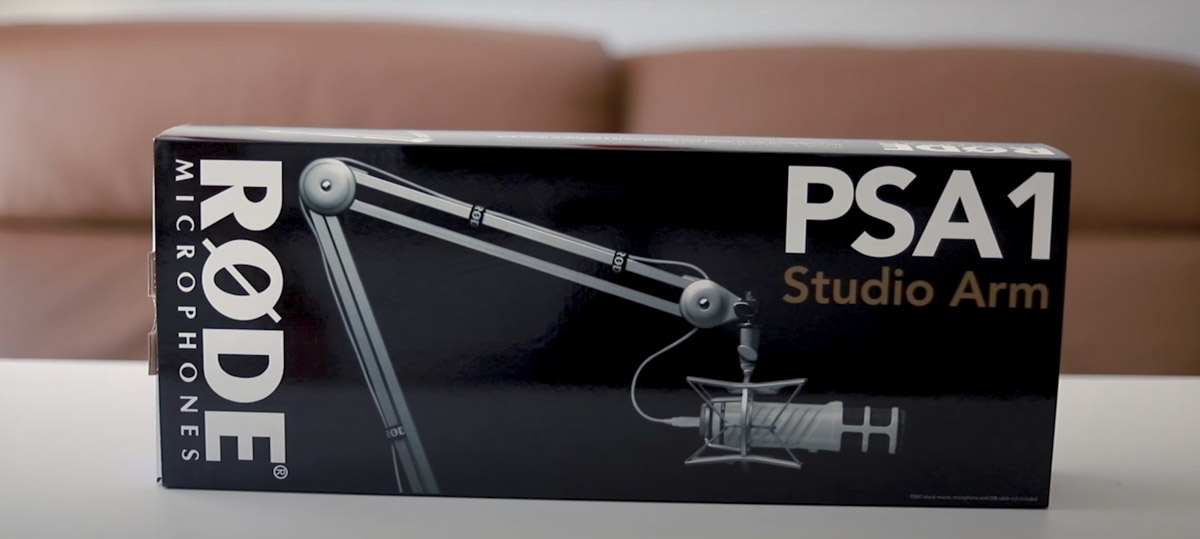
The former is compatible with desks that are up to 55mm thick, while the latter is ideal for surfaces that are no more than 70mm thick. If for some reason you didn’t like the Rode PSA1+, the PSA1 can be a great alternative. The materials from which this unit is made are not only of high quality but also lightweight.
More to this, the joints are meticulously engineered to minimise noise while increasing stability. The lower and upper arm are fitted with Velcro straps that will help you keep the wires in the right place. Nonetheless, the cable management system isn’t the best since it does not hide the wires.
Also, the Velcro wraps may weaken over time, thus causing the cables to hang loosely on your work desk. This microphone arm has a maximum load capacity of 1.1 kilograms. With this in mind, ensure that the weight of the shock mount and the microphone does not exceed the recommended load limit.
The attached adaptor thread is compatible with most microphones and shock mounting systems. Because it has a tool-free design, you can adjust the microphone arm horizontally or vertically by hand.
Once adjusted, the joints will lock in place, thereby keeping your microphone in the position that you want. If you plan to record audio with the microphone hanging above your monitor, this is one of the best mic arms that you can use.
5. Best Value: Brateck Professional Microphone Boom Arm Stand
No products found.
We recommend the to users who have limited space on their desks. This unit has a minimalistic design and also comes with clips that will allow you to tuck away unsightly cables.
Like most of the microphone arms that we have listed in this piece, the Brateck MDS06-1 offers two mounting options for your convenience. By using the clamp, you can easily install this unit without having to drill a hole in your desk.
Moreover, it is compatible with most microphones from major brands such as Blue Yeti, Shure, Rode, Sennheiser, etc. It has a tension screw that will enable you to adjust the articulating arms according to your preference.
And even though some of its parts are made of plastic, the joints are durably crafted from high-quality metal to prevent wear and tear. Additionally, this microphone arm is very silent, so don’t expect it to make creaking sounds when adjusting the position of the microphone.
Despite its size, it can securely hold microphones that weigh up to 1kg. If you are using a shock mount, you should try as much as you can to balance out the weight of each accessory such that the total weight is less than a kilogram.
The standard thread adaptor can easily connect to most mic mounts currently available on the market. And the fact that the arm is 360-degree rotatable makes it even more convenient because you can position it at different angles without lowering its level of stability.
But it doesn’t end there; all the parts are designed with the safety of your microphone in mind, so you can use this mic arm having full assurance that it won’t fail you. This equipment is reasonably priced and can be an excellent pick for those who are looking to buy a high-quality microphone arm without breaking the bank.
6. Best Microphone Arm for Blue Yeti: Findyouled Microphone boom Arm Stand
No products found.
With a maximum load capacity of 2.5 kilograms, the is one of the best high-rise mic arms that you can buy for heavy microphones. It comes with additional accessories that will help you make high-quality audio for your audience.
The kit is inclusive of a pop screen that is double-layered for increased performance. With the pop filter in place, the microphone will be less likely to pick up unwanted sounds while you are recording or streaming.
Also, it will prevent saliva from splashing on your microphone, making this a great choice for music studios. Furthermore, the pop shield has a gooseneck that will allow you to make quick adjustments.
Like the microphone arm just before it, the Findyouled FD003145 is compatible with different models of microphones. It has three cable ties that can help keep the microphone wire neatly tucked away.
In addition to this, the arm is spring-loaded to prevent unwanted movements when you are working. To make it even better, the spring is hidden out of sight to give the microphone arm an aesthetic appearance.
The C-clamp can attach to all desks that are less than 6cm thick. And because it has a wide contact area, it won’t shift positions as you adjust our microphone. The lower section of the clamp can also function as a headphone hook. This may, however, vary depending on the size of the headsets that you are using.
What’s more, the base is fully rotatable, while the upper arm is adjustable up to 180°. You can also swivel the 9.525mm screw adaptor up to 270°. If your microphone is not compatible with the aforementioned adaptor, you can attach the 15.875mm mic adaptor.
With all these features, you’ll be able to adjust your microphone to a suitable angle and height for enhanced audio quality. In terms of build quality, the unit is built from heavy-duty aluminium for durability purposes.
7. Best Budget: Neewer Microphone Arm Stand
No products found.
Coming from a manufacturer that is known for making high-quality products, the is not only durably built but also has amazing features that can assist you when using different types of microphones.
It has a maximum load capacity of 1.5 kilograms and is also adjustable. That said, you can customise the height based on your preference. Additionally, you will be able to change the angle placement of your microphone according to your sitting position.
The base is fully rotatable, so you can position it at whichever angle you want. To add to its list of features, it has a locking mechanism that prevents the arm from moving about. The dual-size adaptor can hold varying sizes of microphone mounts, so you won’t have a difficult time working with this unit.
Moreover, there is also a holder on which you can attach dynamic mics. The mounting bracket is conveniently padded to prevent the mounting system from damaging your desk. It has a maximum width of 5.3cm and can firmly attach to all compatible desks.
Besides all this, the mic arm has movable cable straps that you can adjust depending on the length of the wire that you are using. The aluminium alloy used in making this microphone arm is both tough and lightweight.
Plus, it is coated to increase durability. This is one of the most affordable microphone arms Australia has to offer, thus making it a good choice for everyone who is looking to save a few bucks. Besides, it is more reliable than most high-end models on the market.
However, you should be careful not to exceed the load limit as this will lower the unit’s overall stability. This particularly applies when you are using heavy microphones and shock mounts.
On the bright side, this microphone arm is sturdily built for maximum stability. The included accessories are equally durable, giving you even more reasons why you should buy this product.
How We Researched the Best Microphone Arms
We started our search for the best microphone arms by visiting local e-commerce stores to identify some of the mic arms frequently bought by Aussies. Additionally, we consulted professional review sites and also researched to find the best-selling microphone arm brands in Australia. To create a list of the top-rated microphone arms, we only picked products made by reputable brands such as Elgato, Rode, Neewer, Findyouled, Brateck, and Gator Frameworks.
Our team came up with a criterion for choosing the best microphone arms based on our research findings. The above-reviewed products were chosen based on Compatibility, Wire management, Maximum load capacity, Stability, and Height range. For the selection process, we proceeded to Amazon Australia and picked microphone arms with good customer reviews and ratings.
The initial list was made up of 15 products, but we had to trim it down by removing microphone arms that were of questionable quality. We also eliminated products that didn’t seem to offer good value for money. By the time we were done doing the comparisons, we only had 7 microphone arms on the list. So what you are seeing is indeed a list of some of the best microphone arms in Australia.
Microphone Arms: Buying Guide
When shopping for the best microphone arm, there are several things that you should keep in mind before picking a particular option. Moreover, these units differ in terms of stability, versatility, and overall build quality.
Additionally, some microphone arms come with additional accessories that can come in handy in different scenarios, so you should always take your time to ensure you buy the right equipment.
What to Consider When Buying a Microphone Arm
Compatibility
Before buying a microphone arm, you need to check if the equipment in question is compatible with the microphone that you intend to use. Most, but not all, microphone arms come with universal 6.35mm thread adapters on which you can attach a range of microphones.
If you are going for a microphone arm with a pre-installed clip holder, ensure that the diameter of the clip can accommodate the size of the microphone that you are using.
Wire management
Nothing beats the feeling of working on a clean tidy desk. Well, one of the best ways to achieve this is by tucking the pesky cables away. That said, you should consider purchasing a microphone arm with cable clips/straps that can prevent the cables from hanging loosely atop your desk.
This will not only make your work area look neat but also frees up more space. Virtually all the microphone arms that we have covered in this guide feature built-in wire management systems that will help you keep the cables in check.
Maximum load capacity
Ensure that you pick a microphone arm that can securely hold your mic without it drooping or falling over. The good news is that most manufacturers list the maximum weight capacity under the product’s specs.
You should keep in mind that the maximum load capacity includes the weight of the microphone, shock mount, and any other accessory that is attached to the mic arm.
Stability
We bet you wouldn’t want to spend your money on a microphone arm that is unstable or unreliable. As such, we recommend that you pick a sturdily built unit that can securely hold your microphone without being pulled down or toppling over. You should focus your attention on the mounting base, joints, and microphone holder.
Height range
Most microphone arms are height adjustable, meaning they’ll allow you to raise or lower your microphone to the preferred level. However, the height range varies from one microphone arm to another, so you need to select a unit that matches your needs.
If you are using a low desk, we suggest that you buy a microphone arm with a large height range. This way, you will be able to make the needed adjustments with no restrictions.
You may also be interested in:
- The Best Monitor Arms for Cleaner Desks & Improved Ergonomics
- The Best Ring Lights for Flawless Filming & Perfect Photos
- The Best Smartphone Gimbals for Professional Quality Videos
- The Best Green Screens for Professional-quality Chroma Keying
- The Best Gaming Microphones for Crystal Clear Voice Recording
Last update on 2026-08-17 / Affiliate links / Images from Amazon Product Advertising API