
From the archive. This review was first published in 2020 and is kept for reference. The product may have been replaced or discontinued, and prices will have changed. For current picks see The Best Wireless Gaming Mouse in Australia.
Logitech G502 Lightspeed Review – Light Years ahead?
This Logitech G502 Lightspeed review covers everything you need to know before you spend your hard-earned cash. Is this wireless gaming mouse worth the money?
On this page
ⓘ We are reader-supported and may earn a small commission at no additional cost to you if a purchase is made through one of our links.
Gaming enthusiasts are well aware of Logitech’s ability to constantly deliver high-quality peripherals and the Logitech G502 gaming mouse is no different. With countless gaming mice on the market, it can be a challenge separating the champions from the chuff. Well, we are here to help and this Logitech G502 Lightspeed review will shed some light on Logitech’s wireless gaming mouse.
Logitech G502 is undoubtedly one of the best gaming mice on the market, but how about the newly launched wireless variant – the G502 Lightspeed? Will it be able to top the chart of one of the best wireless gaming mice in the market? In this Logitech G502 Lightspeed review, I’ll look at all of the major aspects of this mouse including its features, price, and other specs related to its design and comfort.
And please don’t worry if you have a hectic schedule. Well, gamers are the busiest people on this planet, after all! To make your life easy, you can skip to the different sections of this Logitech G502 Lightspeed review:
- Overview
- Logitech G502 Lightspeed Features
- Design and Comfort
- What It’s Like to Use?
- Final Thoughts
- Logitech G502 Lightspeed Review FAQs
- Full Spec List
Overview
Before getting into the specs, let’s take a look at what types of games this mouse is suited to. Looking at the specs, the Logitech G502 Lightspeed is suitable for playing almost any kind of game as it comes equipped with 11 programmable buttons and has a high DPI (25k). Yes, the upgraded features!
And the exciting part is that the DPI button is placed in such a way that it falls right near to your thumb. It makes it easier for you to frag out in games like CS:GO.
There are also some extra buttons along the side that allow you to customize for MMOs in order to access your different abilities and increase your APM. It’s Hero 16K sensor, and high DPI makes it suitable for playing shooting, strategy, and pretty much any other kinds of games.
You can add additional weights (up to 16gms) if you like a heavier mouse, which some people do if they’re used to a different mouse. Moreover, it’s also compatible with Logitech’s inventive PowerPlay wireless-charging system.
The mouse is very good overall with an excellent design, elongated buttons, and palm grips to add to your comfort. However, it’s expensive compared to its wired variant. If you plan to go with the wireless charging system, get ready to add $100 to the total cost.
Logitech G502 Lightspeed Features
Logitech G502 Lightspeed wireless mouse comes with some exciting features that are better than its previous version.
Optical Sensor: Logitech G502 comes with an optical sensor to give unrivalled performance and 10x improvement in power efficiency. It will definitely take your gaming experience to a different level.
25K DPI: You get an upgraded DPI in Logitech G502 Lightspeed wireless mouse. Earlier, the maximum DPI was limited to 16K, but you get an exceptionally high DPI for a better gaming experience in this variant. This G Hub update gives a high and speedy performance.
It is both wired and wireless. You get a detachable cable with this mouse so that you can use it with or without the cord at your convenience. This is the first time that Logitech has released a wireless connectivity mouse. It saves gamers from the hassle of wires and increases the overall gaming experience.
Maximum 1000 Hz of polling rate: A higher polling rate in which Logitech G502 Lightspeed offers helps you play games without any lag. It is suitable for playing big games such as WoW.
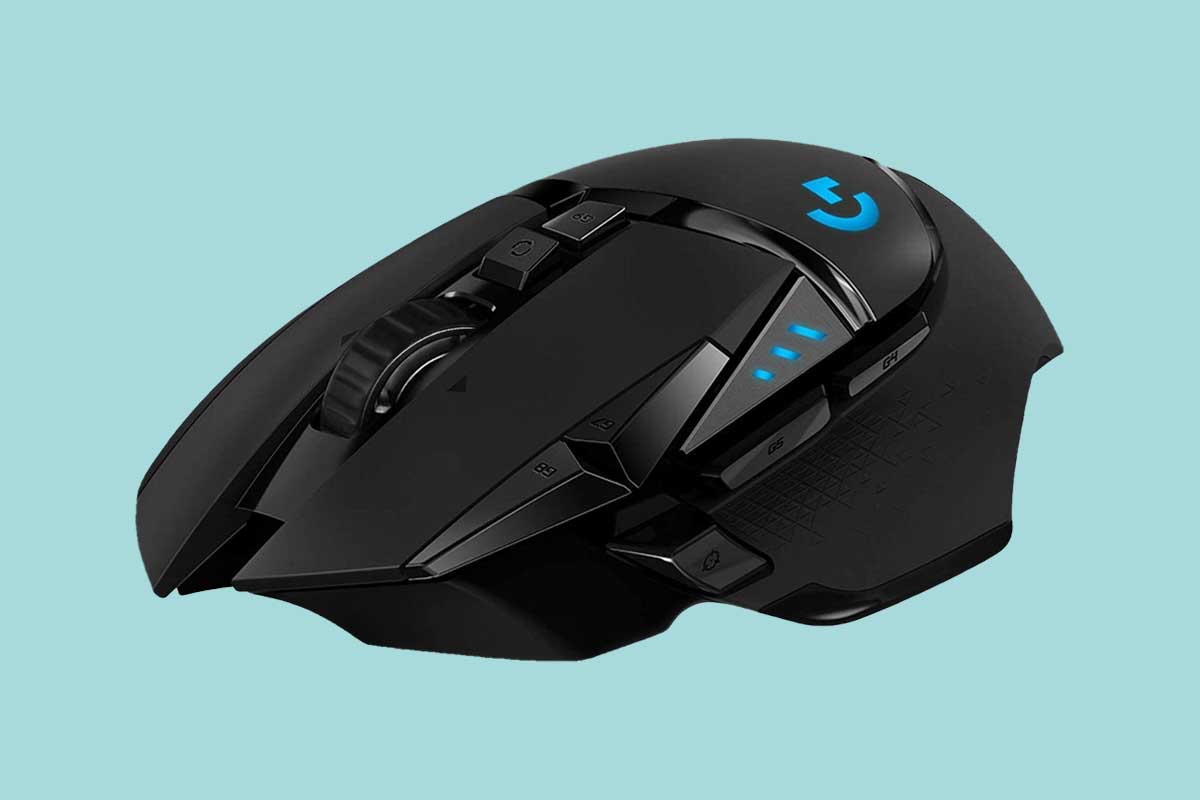
Eleven programmable buttons and three side buttons: The best thing about Logitech G502 Lightspeed is its buttons. It comes with several customizable programmable and side buttons. Moreover, the placement of buttons is done very cleverly, such that you don’t find it difficult to control your mouse while playing.
Overall, the features appear to be better when compared to a wired variant of the same mouse. It has increased DPI and polling rate. Moreover, it is designed in such a way that it appears thinner and more compact. Plus, you get customizable weights and also a small pouch to keep your weights when they are not in use. Now let’s look at the design and comfort in the next part of the Logitech G502 Lightspeed review.
Design and Comfort
As far as the design is concerned, Logitech G502 Lightspeed comes with a sleek and elegant design. By its appearance, you can tell that it’s obviously a gaming mouse. Nonetheless, the design is essentially the same as its wired counterpart. The difference is in the shape of the weights. The earlier version has hexagonal weights, while this version has a better shape of weights. Also, the plastic is thinner as compared to the previous version, which makes the mouse appear less bulky.
In terms of comfort, Logitech G502 is a great mouse. It has a perfect grip, and also the button placement is excellent. However, this mouse is not suitable for people with small hands. For people with large and medium hands, it’s a great mouse. Its sharp edges make the mouse all the more attractive and stylish.
What It’s Like to Use?
The mouse is undoubtedly comfortable to use. It’s light and handy. You can efficiently operate the mouse, give commands, and play different kinds of games, be it shooting, card, racing games, and so on. Above all, the click latency of the mouse is superb. It adds to the overall gaming experience.
You get a user manual with the mouse, making it pretty easy to use and install. Overall, the G502 Lightspeed is a pleasure to use
Final Thoughts
So, what’s my take on this mouse?
Other than the price, everything else seems perfect with this mouse. It’s the first time that a wireless mouse is launched by Logitech, and they have certainly done an excellent job. It comes with an upgraded DPI and polling rate. Even the programmable buttons are better placed and designed as compared to the earlier mouse.
Logitech G502 Lightspeed Review FAQs
[A
Is Logitech g502 Lightspeed good?](#)
Yes, the Logitech g502 Lightspeed is a top-notch gaming mouse that delivers superb performance for gamers. It uses quality components throughout which means low click latency, consistently highly accurate and durable. It can be used wired or wireless and is a very comfortable mouse for long gaming sessions.
Last update on 2023-03-11 / Affiliate links / Images from Amazon Product Advertising API
[A
Does g502 Lightspeed work with PowerPlay?](#)
Yes, the Logitech g502 Lightspeed can be charged using PowerPlay.
[A
Is Logitech Lightspeed faster than wired?](#)
Well, according to Logitech, their wireless technology will deliver a signal faster than wired. We haven’t tested this ourselves.
[A
Which is better g502 or g903?](#)
We’d give the edge to the g502 range. It is just such a well-designed mouse that can expertly accomplish a wide range of PC tasks but excels as a gaming mouse.
[A
How heavy is the g502 Lightspeed?](#)
The Logitech g502 weighs 114 grams. This makes it a little heavier than a lot of the FPS-designed gaming mice.
Full Spec List
| PHYSICAL SPECIFICATIONS |
| Height: 132 mm |
| Width: 75 mm |
| Depth: 40 mm |
| Weight: 114 g mouse only |
| Optional extra weights: up to 16 g |
| TRACKING |
| Sensor: HERO™ 25K |
| Resolution: 100 – 25,600 DPI |
| Zero smoothing/acceleration/filtering |
| Max. acceleration: > 40 G1Tested on Logitech G240 Gaming Mouse Pad |
| Max. speed: > 400 IPS2Tested on Logitech G240 Gaming Mouse Pad |
| RESPONSIVENESS |
| USB data format: 16 bits/axis |
| USB report rate: 1000 Hz (1ms) |
| Wireless report rate: 1000 Hz (1 ms) |
| Wireless technology: LIGHTSPEED Wireless |
| Microprocessor: 32-bit ARM |
| DURABILITY |
| PTFE Feet: 250-km range3Tested on Logitech G240 Gaming Mouse Pad |
| BATTERY LIFE (CONTINUOUS USE)4TESTED ON LOGITECH G240 GAMING MOUSE PAD |
| Default lighting: up to 48 hours |
| No lighting: up to 60 hours |
| 5-minute charge on USB 2.0 gives 2.5 hours of gameplay |
| OTHER FEATURES |
| Hyper-fast scroll wheel |
| POWERPLAY compatible |
| Onboard memory |
| LIGHTSYNC RGB: 2 zone |
| Mechanical Button Tensioning System |
| REQUIREMENTS |
| Windows® 7 or later |
| Mac OS® X 10.11 or later |
| Chrome OSTM |
| USB port |
| Internet access for Logitech G HUB software download5Advanced features require Logitech G HUB, available for download |