
Razer Basilisk V3 Review: The Gaming Mouse That Punches Above Its Weight
The Razer Basilisk V3 is a feature-packed gaming mouse that delivers a precise and comfortable experience for gamers. Its ergonomic design, customizable buttons, and adjustable scroll wheel make it a versatile option for gamers of all genres.
ⓘ We are reader-supported and may earn a small commission at no additional cost to you if a purchase is made through one of our links.
I have been hands-on with the Razer Basilisk V3 Gaming Mouse for over 3 weeks now and have to say it’s an excellent value-for-money gaming mouse that delivers more than the price tag suggests. I’ve used numerous budget gaming mice over the years, including the Basilisk V2 but the Razer Basilisk V3 has some standout features that set it apart from the majority of other budget gaming mice.
First Impressions
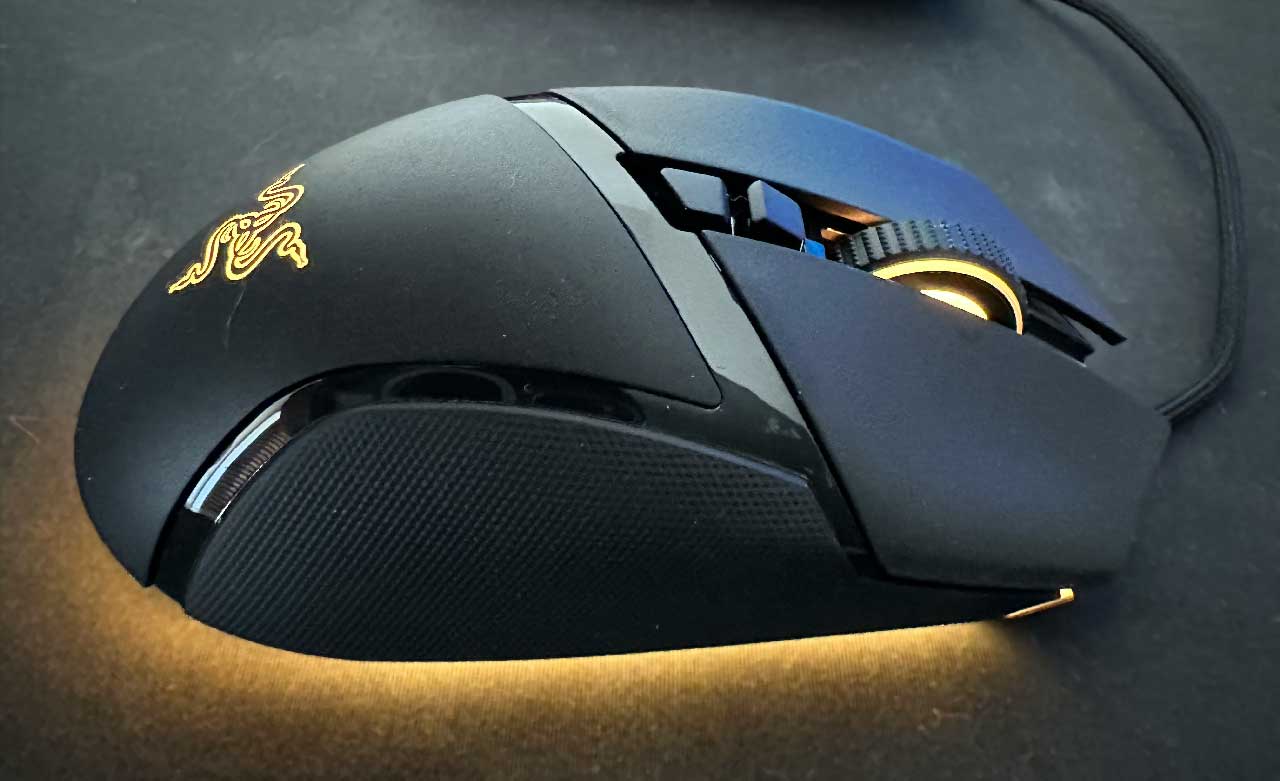
The Razer Basilisk V3 is a lightweight yet solid mouse with an aggressive gaming aesthetic. It doesn’t look too dissimilar to other mice around the same price point as the Logitech G502 Hero but does have some small details that set it apart. For example, there are rubberised side panels for extra grip with an inset shiny plastic panel separating the grip from the rest of the mouse. It’s nothing special but adds more detail to the overall look of the device.
I have average-sized hands for a man and find the Razer Basilisk V3 to be a perfect fit. The thumb rest is positioned perfectly, all of the buttons are comfortable to reach and it glides smoothly across the mouse mat.
Key Features
Considering the price point of this gaming mouse, Razer has included some impressive features that have made using this mouse a very enjoyable experience.
10+1 Programmable Buttons
I play a wide range of games but most of my time is spent playing first-person shooters like Overwatch and Valorant. The programmable buttons make it easy to assign all the in-game abilities I need to my mouse, allowing me to focus my other hand on movement.
Hyperscroll Tilt Mouse Wheel
You’re probably used to a scroll wheel clicking in, scrolling up and down, and that’s it. Well, Razer has included two additional inputs, tilt left and tilt right. This isn’t something I have used personally but I can how useful this would be for RTS games like Starcraft.
Smart Scrolling
There are two modes of scrolling that can be switched between. The first is a tactile feedback mode where each “scroll” is felt. This is what I use when scrolling through my weapons on Valorant. The tactile feedback is perfect for you letting you know you have switched from your primary to secondary weapon for example.
The second mode is smooth scrolling which is what I use when browsing the internet or need to navigate a large document. Razer also suggests this mode is perfect if you program one of the scroll directions to a repeatedly used game command.
High-precision Optical Laser
Accuracy is everything when it comes to gaming and having a gaming mouse with a high-precision optical mouse sensor is very noticeable.
The Razer Basilisk V3’s 26,000 DPI and 650 IPS is the best-in-class sensor giving you the best bang for your buck for any gaming mouse within this price category.
Chroma RGB
Razer Chroma RGB lighting zones are a hallmark of the Razer device’s exceptional customizability and the Razer Basilisk V3 is no different.
The ability to tailor the lighting effects to my preferences, combined with the full under glow, results in a visually stunning experience that adds a real atmosphere to my setup.
Razer Basilisk V3 Specs
Cable: 6 feet (1.8m) braided
Weight (excluding cable): 3.3 ounces (93.55g)
Sensor Model: Razer Focus+
Max Sensitivity: 20,000 native or 26,000 via software
Measurements: (LxWxH): 5.11 x 2.36 x 1.65 inches (129.79 x 59.94 x 41.91mm)
Polling Rates: 125, 500 or 1,000 Hz
Programmable Buttons: 13, including 5x scroll wheel
LED Zones: 11
Connectivity: USB Type-A cable
My Experience After Two Weeks
I have been very happy with the Razer Basilisk V3. It’s been a huge upgrade over the mouse the Logitech MX Master 3 I have been using (yes I know it isn’t a gaming mouse but that’s what I’ve been using). The additional buttons, high DPI and comfort have made a noticeable difference to my gaming experience – particularly when playing Valorant and needing high accuracy.
The Free-Spin Mode and Tactile Mode features of my device proved to be valuable tools in enhancing my browsing experience. Although I primarily used them for browsing, the scroll wheel was also highly responsive in games – allowing me to quickly switch weapons.
During my time using the V3, I found one key drawback to being its bulky, wired design, which may not be the most portable option for those frequently on the move. While carrying and switching devices with this mouse can be somewhat inconvenient, the impressive range of functionalities offered more than compensates for this minor inconvenience.
I can definitely recommend this gaming mouse!